Reader positioning: You are familiar with React but want to take RSC (React Server Components) to the depth where you can design systems. This article targets engineering practice and will not shy away from details — including the Flight Protocol’s wire format and my own judgements.
The following content is divided into four layers:
- Why RSC exists (design philosophy)
- How it actually runs (tree splitting and streaming rendering)
- What Flight Protocol actually transmits (line-by-line wire format breakdown)
- How to do it right in engineering (boundary declarations, action protocols, and caching)
1. Design Philosophy: Treating the UI as a Computable Tree
The core of RSC is not “faster” but making the structure of the UI closer to the real shape of data and computation. In traditional CSR/SSR practices, data fetching, permission checks, view assembly, and interaction logic are often mixed together. The resulting component tree “looks like a page” but does not “look like computation”. RSC flips the script: you build the UI from the perspective of computation and dependencies. The component tree is first a computation graph, then a visual structure. When you treat it as a computation graph, you must answer: Where does this slice of UI get its data? Where does the computation run? Where does interaction live?
From this question, RSC emerges with three “hard philosophies”. First, compute near data. All computations that do not rely on browser capabilities should happen on the server because that is where the data lives and where permission and security boundaries reside. Second, leave interaction to the browser. Interaction implies events, animation, and instantaneous state; those concerns naturally belong in the browser, so a client boundary should only carry interaction rather than data computation. Third, the tree follows data dependencies. Component splitting is not a “frontend/backend handoff” but an answer to “where does the data come from and when is it available?”. This philosophy dictates how you organize your tree: split by data domain, not by technology domain.
These philosophies are not abstract slogans—they directly reshape how you organize UI. RSC separates “structure” from “interaction”, extracts “data computation” from the visual declaration, and lets the UI become a tree you can reason about. Server Components are data-driven structure, Client Components are interaction-driven containers; this is not a recommendation but an architectural constraint.
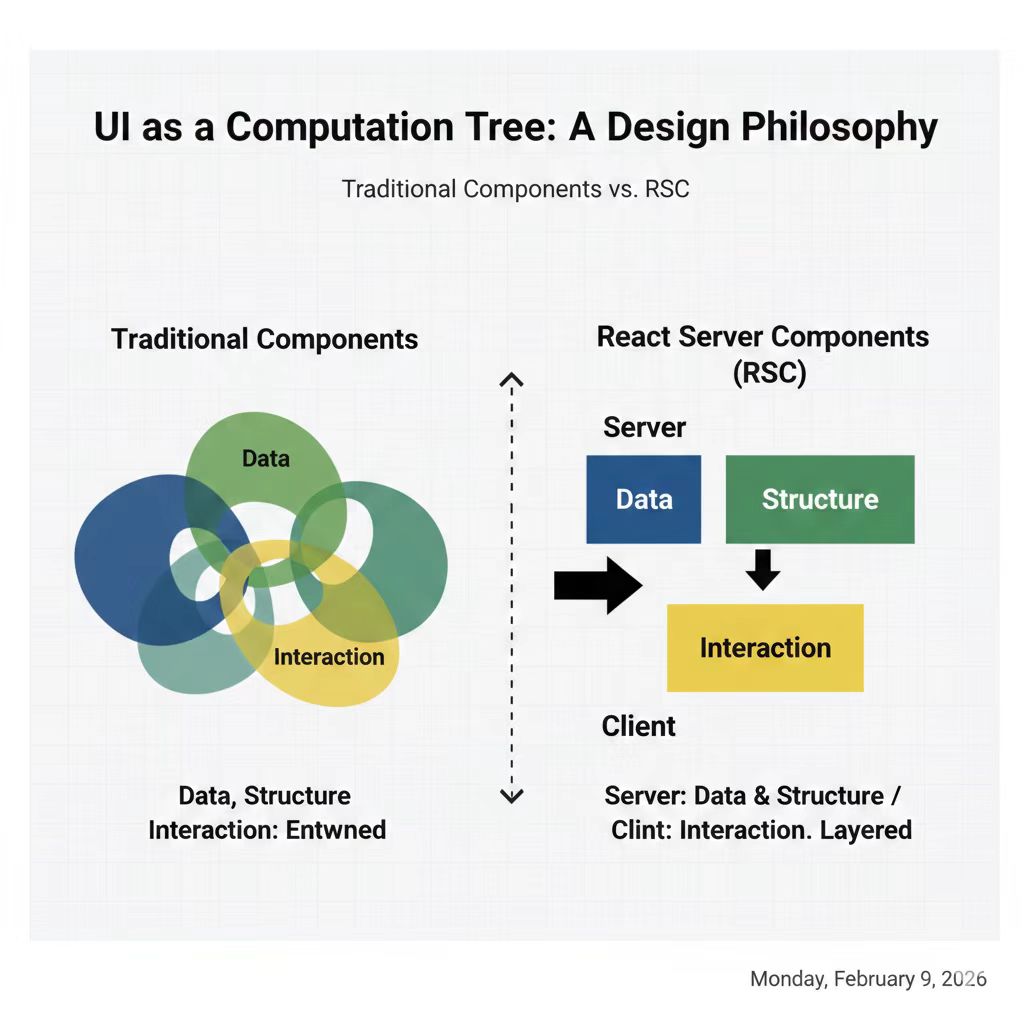
Figure 1: Design philosophy comparison—traditional components mix data, structure, and interaction, while RSC layers server structure and client interaction.
2. Tree Splitting and Streaming Rendering
2.1 How the Tree Splits
The core action of RSC is not “rendering” but splitting the component tree into two pieces and establishing stable boundaries. React identifies use client boundaries while building the tree and treats them as “client islands”. Every node outside the boundary executes on the server and produces a result; every node inside the boundary is marked as a “client-side module reference”—it does not run on the server and merely carries the necessary props across the border. As a result, the tree is split into a “computable server portion” and a “client portion that needs activation.”
The key is not “splitting the code in two” but “splitting the tree in two segments.” The component you author is still a single tree, but at runtime the tree is cut into two layers: the server generates the structure and data, while the client only activates the interaction boundaries. This split is composable—you can declare a client boundary on any subtree instead of being forced to cut the entire page level.
After the server executes Server Components, it produces an RSC payload (its wire format is the next section). The client receives this payload and only hydrates the use client boundaries—it does not “rebuild the entire tree” but simply “completes the interactions inside the boundaries.”
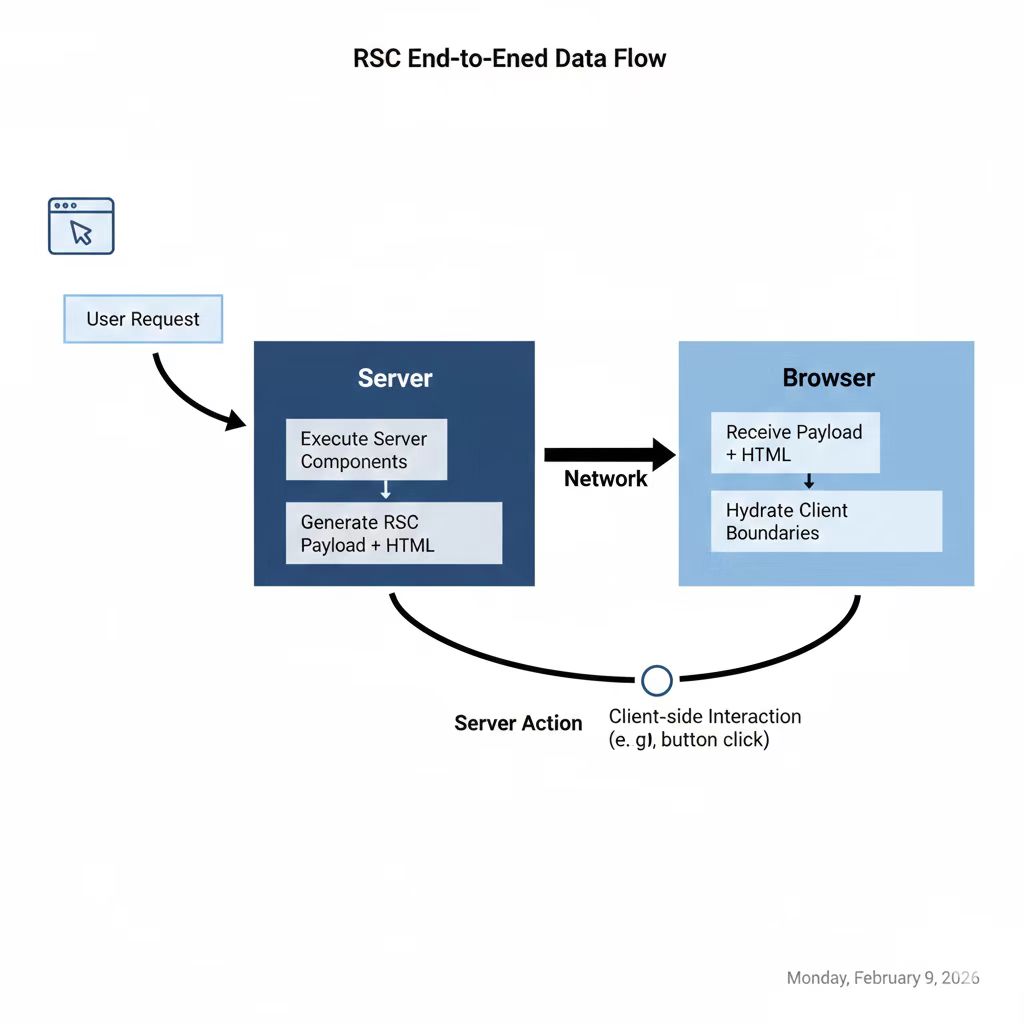
Figure 2: RSC end-to-end flow—request, server execution, payload/HTML, client hydration, and action round-trips.
Below is a minimal example (pure Server Component):
2.2 async Components and Streaming Rendering
RSC’s natural form is async components. The change is not “syntax feels nicer” but the rendering model transforms: components no longer “synchronously return JSX” but “asynchronously return structure.” React can compute the tree in segments and emit them as a stream rather than waiting for the entire tree to be ready.
Suspense acts as a rendering splitter. You can wrap a slow data subtree inside Suspense so that the server first flushes the available portion and then streams the rest as the data resolves. This differs from traditional SSR: SSR waits to assemble the complete HTML before sending it, while RSC emits the first half of the tree immediately and keeps streaming to fill in the rest.
From the Flight Protocol’s perspective, this streaming process becomes quite concrete: the server first emits the lines it has already resolved, inserts a placeholder ($Sreact.suspense) when hitting a Suspense boundary, and when the async component resolves, it appends new lines that replace the placeholder. The client’s Flight decoder is incremental—it continuously consumes the stream and updates the corresponding tree nodes as soon as a new line arrives. This explains why users see the page “pop in block by block” rather than appearing all at once.
3. Flight Protocol: Breaking Down the RSC Payload Wire Format
This is the core section of the article. Most RSC coverage tells you “the server emits a payload, the client consumes it,” and then stops. If you want to truly understand RSC, you must open that black box.
3.1 What Flight Protocol Is
Flight is a line-based streaming protocol designed by the React team to serialize the execution result of the server component tree and ship it to the client. It is not HTML, not JSON, and not any existing standard format—it is a custom intermediate representation crafted for React component trees.
Why not reuse an existing format? This design choice deserves an explanation:
Why not HTML? HTML expresses DOM semantics, not component semantics. Within HTML you cannot distinguish “this is output from a Server Component” from “this is a placeholder for a Client Component.” React needs the browser to know precisely which nodes are already computed by the server and which ones the client must take over. HTML cannot carry that granularity.
Why not JSON? JSON represents a complete structure in one shot and does not naturally support streaming. The server might have multiple async components resolving at different times; with JSON you would have to wait until all the data is ready to emit a single object. Flight’s line-based protocol allows appending one line at a time, with each line independently parsable, so streaming is native.
Why not Protocol Buffers or MessagePack? Flight needs to be parsed directly in the browser and support incremental decoding. A plain-text line protocol on top of ReadableStream with TextDecoder and line splitting incurs very low cost and does not require extra decoding libraries.
The result is Flight: a text-based line protocol + custom markers + cross-line references.
3.2 Real Payload Line-by-Line Breakdown
Take this component tree as an example:
// page.tsx (Server Component)
import { Comments } from "./comments";

export default async function Page() {
  const article = await getArticle();
  return (
    <div>
      <h1>{article.title}</h1>
      <p>{article.body}</p>
      <Comments initialCount={article.comments} />
    </div>
  );
}// comments.tsx (Client Component)
"use client";
import { useState } from "react";
export function Comments({ initialCount }) {
const [count, setCount] = useState(initialCount);
return (
<section>
<span>Comments: {count}</span>
<button onClick={() => setCount((c) => c + 1)}>Add</button>
</section>
);
}If you intercept the RSC request in the Network panel (filter for content-type: text/x-component), you will see a Flight response that looks like this:
1:I["(app-pages-browser)/./src/comments.tsx",["comments-chunk","static/chunks/comments-abc123.js"],"Comments"]
0:["$","div",null,{"children":[["$","h1",null,{"children":"RSC Tree Structure"}],["$","p",null,{"children":"Server renders structure, client handles interaction."}],["$","$L1",null,{"initialCount":3}]]}]
Let’s unpack it line by line:
Line 1—Client Module Reference:
1:I["(app-pages-browser)/./src/comments.tsx",["comments-chunk","static/chunks/comments-abc123.js"],"Comments"]1:— line ID, later lines can reference it via$L1.I— marker indicating this is an Import (a client module reference).- The first argument is the module path (the bundler-resolved identifier).
- The second argument lists chunk information (which JS file the client must load).
- The third argument is the export name (
"Comments").
This line means: Line ID 1 represents a client module; the client needs to load comments-abc123.js and grab the Comments export. The server does not execute this component; it merely records “where it lives.”
Line 0—React Element Tree:
0:["$","div",null,{"children":[["$","h1",null,{"children":"RSC Tree Structure"}],["$","p",null,{"children":"Server renders structure, client handles interaction."}],["$","$L1",null,{"initialCount":3}]]}]0:— line ID 0, which is the root of the tree.["$","div",null,{...}]— the serialized React element:$marks an element,"div"is the type,nullis the key, and the final object holds props.- The first two children are plain HTML elements (
h1,p) whose content has been fully resolved on the server. - Crucially:
["$","$L1",null,{"initialCount":3}]—$L1is a lazy reference to line ID 1. It tells the client, “render the module described in line 1 here with props{initialCount: 3}.”
This is how the Server/Client boundary materializes on the wire: Server Component results are inlined as concrete $ elements, while Client Components are replaced with $L references plus props.
3.3 Flight Type Marker Cheat Sheet
Flight uses single-character prefixes to denote line types. Here are the markers you encounter most frequently:
| Marker | Meaning | Where it appears |
|---|---|---|
I | Client module Import | use client component module references |
$ | React element | Serialized JSX elements |
$L | Lazy reference | References to other line IDs, common for client placeholders |
$Sreact.suspense | Suspense placeholder | Streaming where the inner tree is not yet resolved |
S | Symbol | React’s internal symbols (e.g., react.fragment) |
HL | Hint — preLoad | Resource preload hints |
HM | Hint — preloadModule | Module preload hints |
Note: These markers are not a public API. The React team has never published Flight’s wire format as a stable interface. I’ll discuss what that means in section 5.
3.4 Payload Evolution in Streaming Scenarios
When Suspense enters the picture, the payload is not emitted in one shot but appended in segments. Suppose Page looks like this:
export default function Page() {
  return (
    <div>
      <h1>Dashboard</h1>
      <Suspense fallback={<Skeleton />}>
        <SlowStats />
      </Suspense>
    </div>
  );
}
The Flight response initially emits:
0:["$","div",null,{"children":[["$","h1",null,{"children":"Dashboard"}],["$","$Sreact.suspense",null,{"fallback":["$","Skeleton",null,{}],"children":"$L1"}]]}]At this point $L1 has no corresponding line—the browser renders the fallback first. When SlowStats resolves, the server appends:
1:["$","section",null,{"children":[["$","span",null,{"children":"Total: 1,234"}]]}]The client’s Flight decoder receives this new line, recognizes that line ID 1 fills the earlier $L1 placeholder, and swaps the fallback with the actual content. This is the low-level mechanism behind RSC streaming: you do not resend the whole tree; you append the missing lines.
3.5 Isomorphism with AI SDK streamUI
An important observation: the Vercel AI SDK’s streamUI and createStreamableValue use the exact same underlying transport mechanism—the Flight Protocol. When you build Generative UI with the AI SDK (the server dynamically decides which React components to emit based on LLM output), the wire format is identical to the breakdown above. Each token the LLM emits triggers the server to append new Flight lines, and the client incrementally decodes them to update the UI.
RSC’s streaming design may not have been invented with AI in mind, but its “line-by-line append, incremental decode, Suspense placeholders” model is perfect for AI streaming UI. This is not coincidence—the React team designed Flight to solve “server-side async data becoming ready over time,” and an LLM’s token-by-token production is just an extreme version of that same problem.
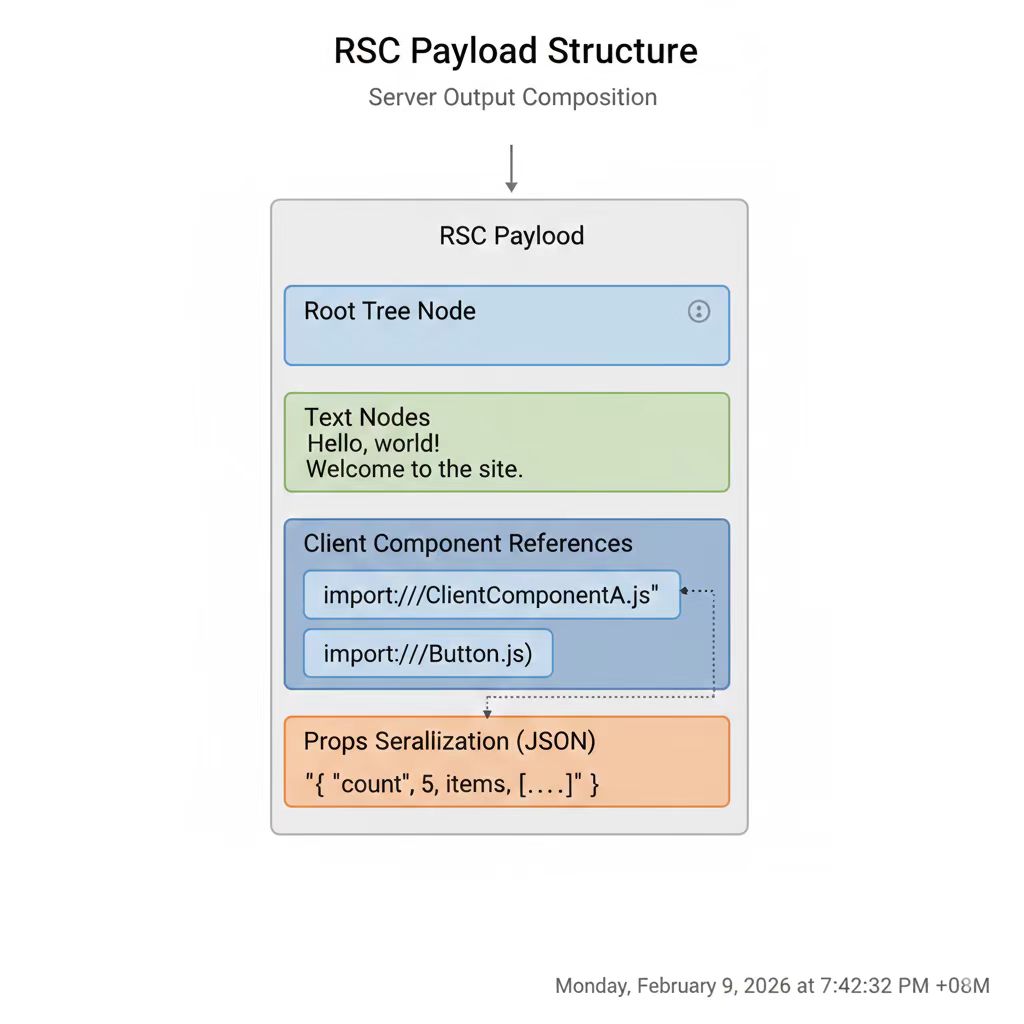
Figure 3: RSC payload structure—tree nodes, client references, lazy placeholders, and props serialization.
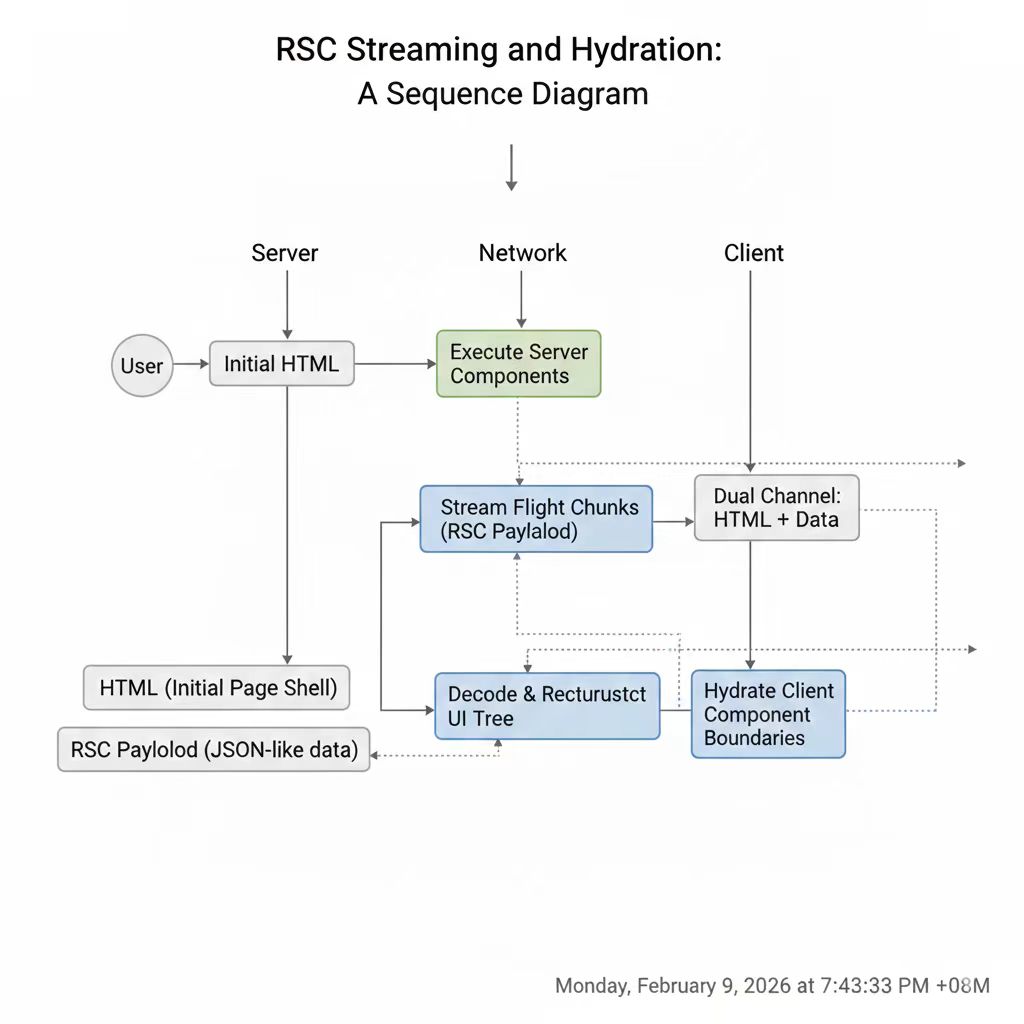
Figure 4: Flight streaming timing—Suspense placeholders, appended lines, and client incremental decoding.
4. Boundary Declarations, Action Protocols, and Caching
4.1 use client: A Semantic Boundary, Not a Performance Switch
The purpose of use client is not “make it faster”; it is a declaration that this part of the tree belongs to the client. From the Flight Protocol’s perspective, this directive has a concrete effect: React serializes the component as an I (Import) line instead of executing it. The interior of the boundary cannot access server capabilities, and the exterior cannot rely on browser state.
The more important engineering implication is that use client directly determines the payload’s size. A large boundary means fewer I lines but heavier props (because the server must serialize more data for the client). A smaller boundary is more precise, resulting in a lighter payload but more fragmented components. The real optimization is not “write fewer use client directives” but “place them at the proper granularity.”
4.2 use server: The Cross-Boundary Action Protocol
use server is a calling protocol: the browser triggers an action, the server executes it, and returns the result. It is not a component but “a server-side function callable from the client.” Architecturally, Server Actions are simply application-layer RPC endpoints—the plumbing (serialization, routing, error handling) is what React removes.
// app/(admin)/posts/actions.ts
"use server";

export async function savePost(formData: FormData) {
  const title = String(formData.get("title") ?? "");
  const body = String(formData.get("body") ?? "");
  // Write to the database or filesystem
}// components/post-editor.tsx
"use client";
export function PostEditor({ onSave }: { onSave: (fd: FormData) => Promise<void> }) {
return (
<form action={onSave}>
<input name="title" placeholder="Post title…" />
<textarea name="body" placeholder="Write something…" />
<button type="submit">Save</button>
</form>
);
}Viewing Server Actions as an application-level API means you should treat them like any API route: input validation, error handling, idempotence, and audit logging. React removes the plumbing, not the engineering discipline.
4.3 use cache: Making Server Computation Reusable
use cache explicitly marks a server computation as cacheable. It is not “an optimization detail” but an architectural decision that affects how often your tree is recomputed.
export async function getPostList() {
  "use cache";
  return await fetchPosts();
}
In Next.js, cache control can further be refined via cacheTag / cacheLife. In practice there is a hard rule: write operations must explicitly trigger invalidation (revalidateTag / revalidatePath), otherwise the cache will make the UI “look stale” — that is not a bug but a missing declaration of the data’s lifecycle.
5. Structural Example: A Reasonable RSC Tree
A healthy RSC tree typically looks like this: the higher layers are all Server, with localized client boundaries isolating interaction.
Page (Server)
├─ Shell (Server)
│  ├─ Sidebar (Server)
│  ├─ Content (Server)
│  │  ├─ Article (Server)
│  │  └─ Comments (Client)   ← the only use client boundary
│  └─ Footer (Server)
└─ Toasts (Client)            ← a global interaction layer
From the Flight payload’s perspective, Shell, Sidebar, Content, Article, and Footer all execute on the server and are serialized as concrete $ element lines. Only Comments and Toasts generate I lines (module references) plus $L lazy references. The client only needs to load and hydrate those two components—everything else has zero JS cost.
6. My Judgement: RSC’s Design Trade-offs and Unresolved Issues
Having explained the mechanics, I want to share some opinions that will never appear in official docs.
Flight Protocol is a protocol without a spec. As of now, the React team has never published Flight’s wire format as a stable public API. All the markers I discussed above (I, $L, $S, etc.) might change in the next React release. That means any framework-level integration with RSC (Next.js, Waku, RedwoodJS) is chasing a moving target. If you want to build debugging tools, middleware, or a custom transport layer around the Flight payload, you must accept “it can break at any time.” The React team’s attitude is “stabilize the semantics first, worry about the wire format later”—pragmatic, but it means the RSC ecosystem is less mature than its adoption numbers suggest.
use client’s serialization constraints are painful in complex scenarios. In theory “only serializable data crosses the boundary” is elegant, but in practice you hit many gray areas: Date objects cannot be serialized directly (you must stringify and parse on the client), Map/Set are not supported, RegExp is not supported, and even undefined behaves differently in JSON. If a Server Component surfaces objects from the database that contain these types, you must insert a manual conversion layer at the boundary. That “type adaptation layer” becomes a genuine maintenance burden in medium-to-large projects. The React team is mitigating this by expanding the serializer (supporting Date, Map, Set, etc.), but boundary-type safety still relies on developer discipline; TypeScript cannot yet catch “you serialized an unserializable object” at compile time.
RSC makes “server by default” a sane mental model, but that default is a trap for newcomers. “All components are Server Components by default” is a nice design for those who understand it because it removes boilerplate, but for those who don’t, it creates an implicit, hard-to-debug error mode. If you write useState inside a Server Component, the error message does not say “this is not a client,” it surfaces a somewhat opaque React internal error. Next.js DX has improved a lot, but the core issue remains: “server by default” turns RSC from an optional advanced topic into a prerequisite you must master before you can use React. That is not inherently bad, but it raises the bar for entry.
7. Summary
RSC is a way of organizing a tree, and the Flight Protocol is the transmission language of that tree.
Server Components are responsible for structure and data, Client Components are responsible for interaction. use client is the serialization boundary, use server is the invocation protocol, and use cache is the declaration of computation reuse. Flight encodes everything into a line-based streaming protocol so that async server computation arrives chunk by chunk in the browser.
When you start inspecting your component tree from the Flight payload’s perspective—asking which nodes are inlined as $ elements, which are replaced by $L references, which are waiting on Suspense lines—you move from the “conceptual level” to the “mechanistic level” of RSC. That’s when your architectural decisions have grounding instead of merely following a set of practices you don’t fully understand.